Docs/Using the builder/HUD screens & pages
Groups, screens & pages
Show and hide parts of your HUD: visibility groups, the screens wizard, the page tab bar, button navigation, and how it all behaves in-game.
Last updated 2026-06-12
Visibility groups ("Show when")
always_visible means exactly that. Any other group starts hidden in-game and appears when something shows it: a button action, a rule calling Show HUD Group, or the screens system switching pages. A widget belongs to one group — set it in Properties → Behavior → Show when.
Creating a screens group
Left panel → Screens → + Create screens group
Pick a name and the number of screens (the < > navigation buttons are added for you).The wizard builds the structure
One wrapper group (always visible) containing one container per page, each with a title and nav buttons, all stacked at the same spot — because only one shows at a time.Build each page
The tab bar above the canvas activates page 1. Add widgets — they land in the active page automatically (the indicator above the canvas shows the destination, switch it to "Whole screen" for HUD that should stay on every page).

Working with pages

- Click a tab to display that page — inactive pages dim and ignore clicks.
- Double-click a tab to rename the page (rules referencing it follow automatically).
- ★ marks the default page — the one players see first.
- + adds a page, × deletes one (two clicks — it deletes the page's widgets too).
- All shows every page stacked — an editing aid only.
Navigating between pages
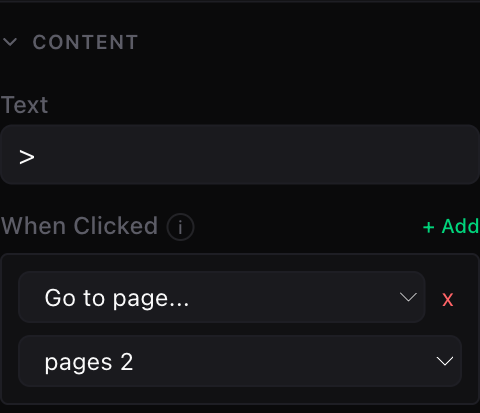
Buttons do the work: the "When Clicked" action Go to page… shows the target page and hides its siblings — exclusivity is automatic within a screens set. Open / Close… toggles a group, Close page… hides one.
For gamepad/keyboard players, enable Tab navigation on the set (Screens panel): shoulder buttons / QE cycle pages.
What happens in-game
- The default (★) page shows when a player joins — including late joiners.
- Interactive pages (those with buttons) capture the mouse cursor while open and release it when closed.
- Rules can drive everything:
Show / Hide / Toggle HUD Groupactions accept any group, pages included.
Pitfalls
⚠️ Watch out
📌 Note
Show HUD Group on it — or make it a page of a screens set.See also